Find the grants you can win. Then win them.

Pursuit matches your nonprofit with funding that fits, runs every application from first draft to submitted, and keeps each award’s reports and payments on one calendar.

Explore Pursuit

Pursuit is launching soon. The screens on this page are a product preview, with an illustrative organization, opportunities and figures.

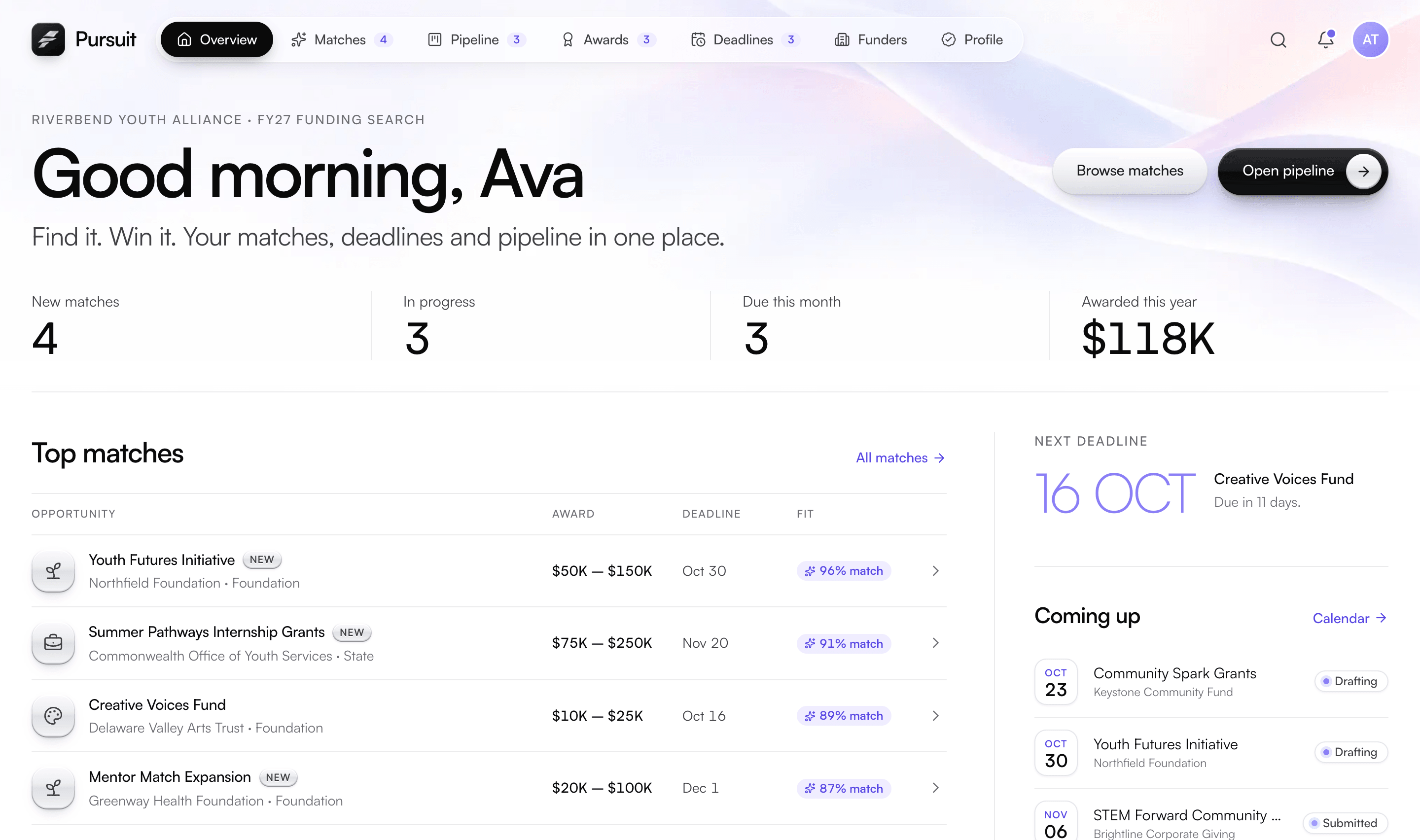
Pursuit overview: new matches, applications in progress, deadlines this month, top matches ranked by fit and the application pipeline
Highlights

Find funding that fits. Keep applications moving.

For nonprofit grant consultants and development teams: funding discovery, application management and award obligations in one workspace.

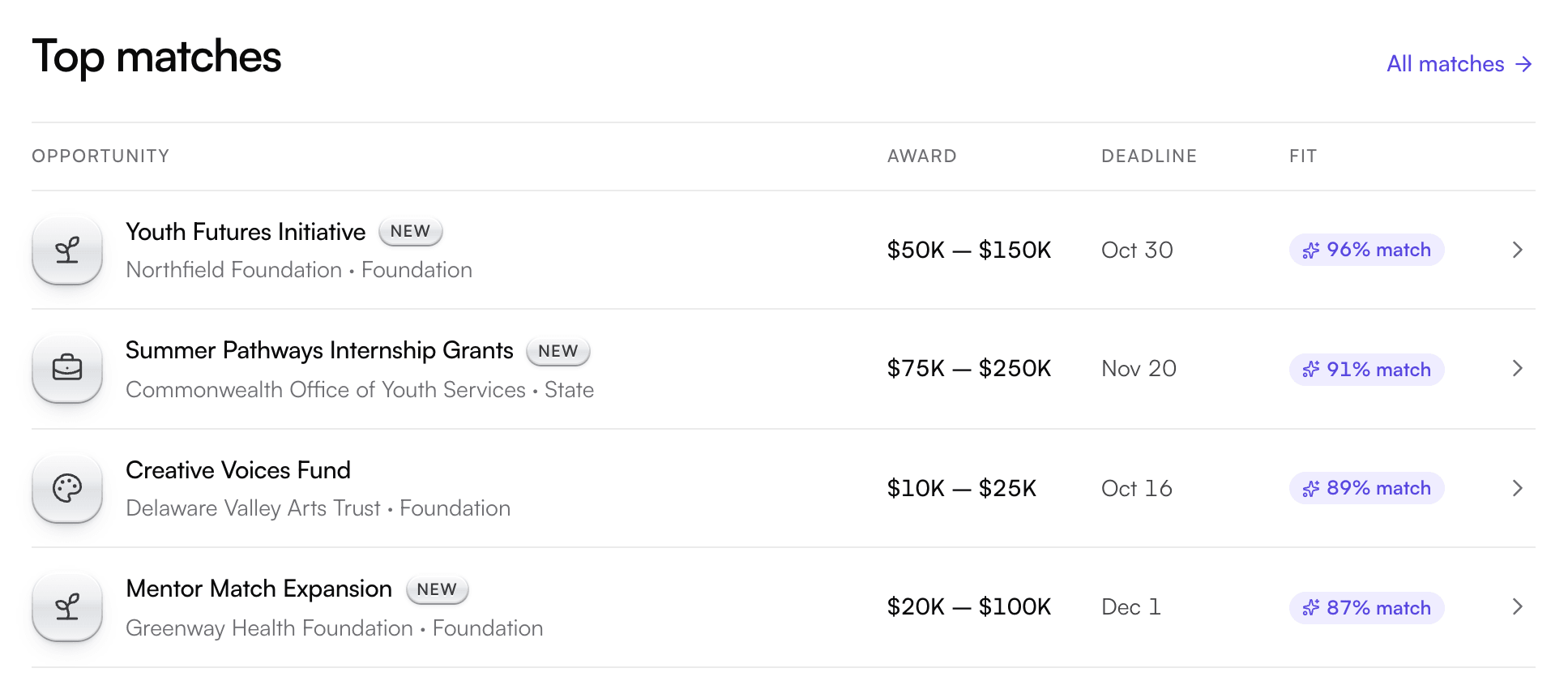
Pursuit top matches: four opportunities with award ranges, deadlines and match scores from 87% to 96%

Product preview: illustrative organization, opportunities and figures

01 / Funding discovery

Make the next application count.

Source-linked opportunities and explainable match scores help a team decide where to invest its time.

A human confirms eligibility and approves application content.

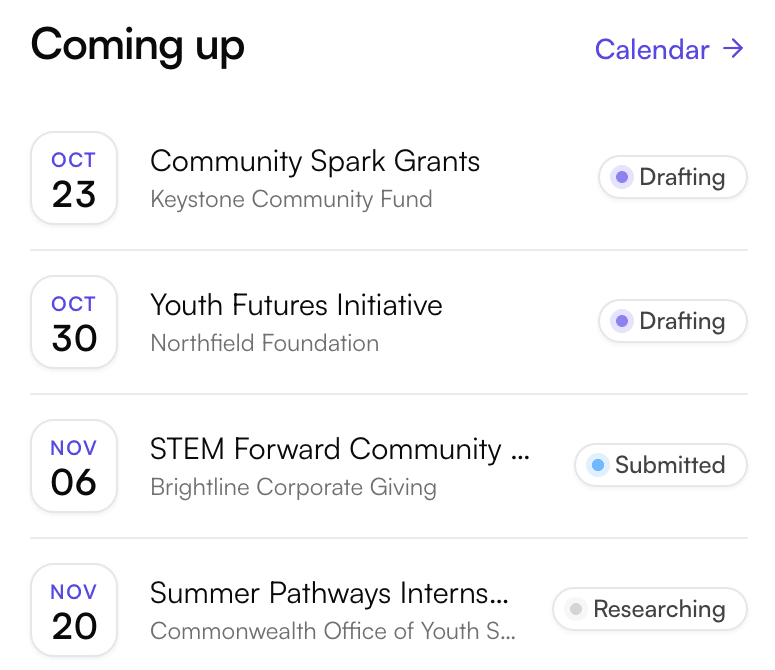
Pursuit upcoming deadlines: four applications with their due dates and stages, from researching to submitted
02 / Shared application work

A clearer handoff for every task.

Track owners, status and due dates. Reuse approved answers and a shared organization profile across applications.

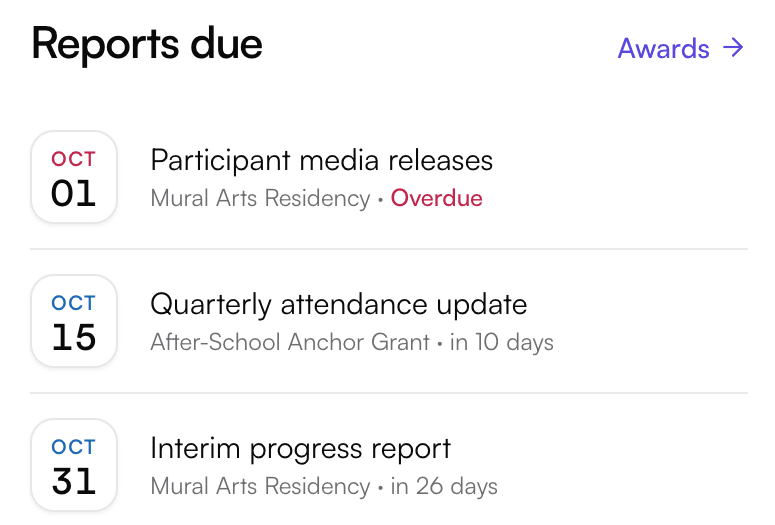
Pursuit reports due: one overdue media release and two progress reports due this month
03 / Reporting calendar

Every report date in view.

Keep report dates, award requirements and supporting evidence in view, next to the applications still in progress.

Overview

What Pursuit does.

Pursuit is grant software for the organizations that apply for grants. It finds opportunities that fit your mission, checks eligibility before anyone starts writing, runs each application with your team and keeps every award on schedule after you win.

Everything starts from one verified organization profile. Your mission, finances, leadership and compliance details are recorded once, along with where each one came from, and reused on every application, so nobody types your EIN or board list again.

Pursuit ranks and suggests; your team decides. Anything Pursuit reads from a funder’s notice or an award letter is quoted from the source and waits for a person to confirm it before it counts.

Our team sets Pursuit up around your programs, brings over your existing tracker and trains your staff on your own grants, then stays with you after launch.

At a glance

Built for
Nonprofits, fiscally sponsored projects and public or tribal entities that apply for grants
Funders covered
Federal, state, foundation and corporate
Where matches come from
Grants.gov, funder websites, rounds run on Granted and opportunities your team adds
Covers
Discovery, eligibility, applications, deadlines, awards and reports
Team roles
Owner, grant writer, finance, program lead and reviewer
Access
In the browser, with your own workspace address
Setup
Configured, imported and supported by our team
How it works

Start to finish, step by step.

1

Build your profile

Tell Pursuit about your organization once: legal name and EIN, mission and focus areas, budget, regions served and the funders you want to pursue.

2

Get matched

Pursuit ranks opportunities against your mission, geography, budget size and history with each funder, and flags what’s new each week.

3

Check eligibility

Before anyone writes a word, each rule is quoted from the notice, red flags are called out and required documents are checked against your library.

4

Plan the work

Add the grant to your pipeline, give every section an owner and set tasks and due dates for the whole team.

5

Write and review

Sections fill in from your verified profile, approved answers are suggested where they fit, finance approves the budget and reviewers sign off.

6

Submit and track

The readiness checklist shows what still stands in the way. Once submitted, the application locks and every date lands on one calendar.

7

Manage the award

Upload the award letter and its terms become requirements with owners, due dates and evidence lists, alongside the payments you receive.

Features

A closer look at Pursuit.

8 areas of the product, what each one does and the details behind it.

Matches

Funding that fits, ranked for you.

Pursuit searches for opportunities every week and scores each one against your organization’s profile, so your team spends its time on grants it can actually win.

  • A score you can readEvery match blends four factors: mission alignment, geography, budget size and your past relationship with the funder. Each factor shows its own score and the profile fields behind it.
  • A confidence levelHigh, medium or low, with a plain reason, such as “no history with this office, so the relationship factor is an estimate.”
  • Four sourcesFederal notices from Grants.gov, funder websites watched for changes, rounds run by funders on Granted, and anything your team enters or imports.
  • Filter and sortNarrow by federal, state, foundation or corporate funders, and sort by best match, deadline, award size or newest.
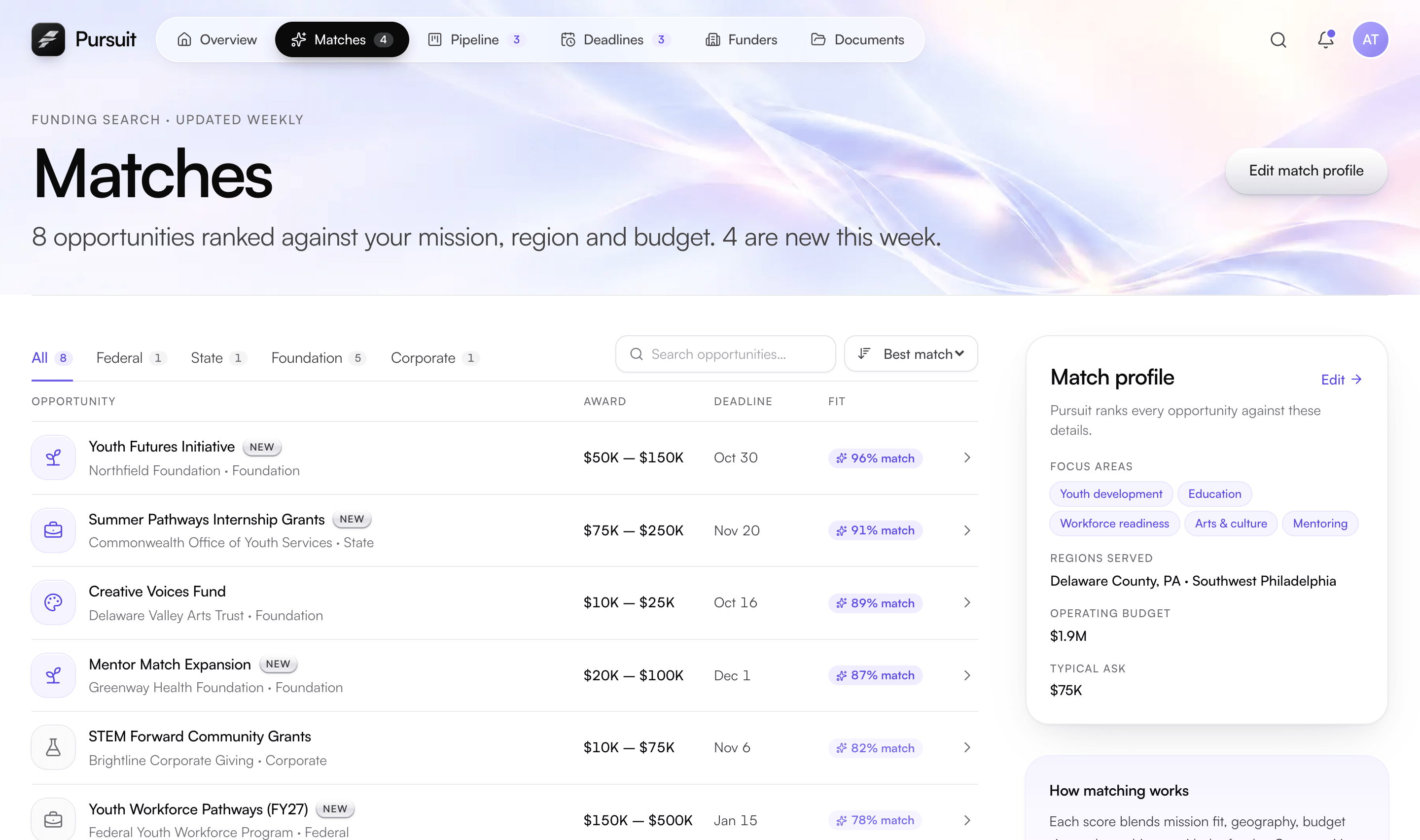
Pursuit matches: eight opportunities ranked by fit, with award ranges, deadlines, match scores and the match profile behind them
Eligibility pre-check

Know if you qualify before anyone writes.

Each opportunity opens with a pre-check built from the funder’s own notice. Pursuit quotes every rule word for word and asks a person to confirm its reading, so a missed requirement doesn’t surface the week it’s due.

  • Rules quoted from the noticeEach rule is marked met or not met next to the exact sentence it comes from. Nothing counts as a rule until someone confirms it.
  • Red flags up frontLong lead times and hard requirements are called out early, for example a SAM.gov registration that takes weeks or a required cost share.
  • Required documents, already checkedThe funder’s attachment list is compared with your document library and each item shows as current, expiring soon, expired or missing.
  • Notice historyEvery opportunity keeps its source, reference number and a dated list of the funder’s revisions. If a notice changes while you’re drafting, your team is told what it affects.
  • Funder snapshotA short profile of the funder, its typical grant size, your relationship with it and a countdown to the deadline.
Application pipeline

Every application on one board.

From the first look to the award, each application moves across one board. Everyone can see what’s in progress, who owns it and what it’s worth.

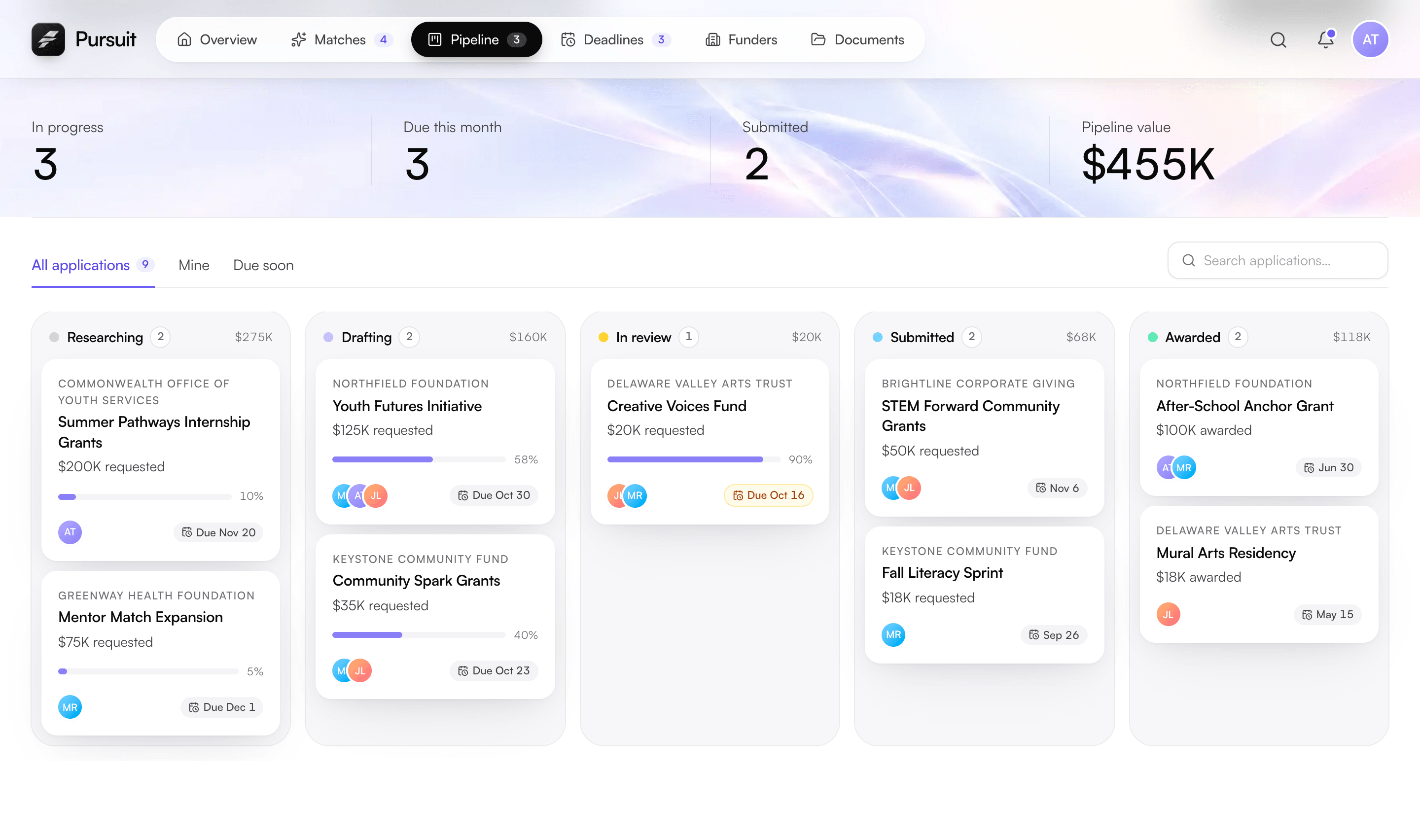
  • Five clear stagesResearching, Drafting, In review, Submitted and Awarded, each column with its count and total dollar value.
  • Cards that say what mattersFunder, amount requested, progress, owners and the due date, highlighted once it’s within 14 days. A flag appears if the funder has changed the notice.
  • Pipeline at a glanceIn progress, due this month, submitted and the total value of open requests, filterable to all applications, yours or those due soon.
  • Bring your old trackerImport a CSV or Excel tracker, map its columns once, and rows that match existing records are merged rather than duplicated. Federal notices import straight from Grants.gov.
Pursuit application pipeline: a board of grant applications in researching, drafting, in review, submitted and awarded columns
Application workspace

Write once. Reuse everywhere.

Each application has its own workspace: the funder’s prompts, your team’s sections, the budget and everything still needed before you can submit.

  • Sections with owners and limitsA standard outline (organization overview, statement of need, program design, evaluation plan, budget and attachments), each with an owner, a status and a live word count.
  • Prefilled from your profileVerified profile fields fill in where they belong, tagged with which field was used and when it was last verified.
  • Approved answers, suggestedNarrative your team has already approved is suggested for the section you’re writing. Writers choose to insert or compare it; nothing goes in on its own.
  • Budgets finance signs offEach budget is versioned and approved by a named person. Pursuit checks it against the narrative, such as four sites described but three coordinators funded, and exports to CSV.
  • Readiness checklistSections complete, eligibility confirmed, documents current, budget approved and reviewers signed off. Pursuit lists anything it can’t find.
  • Versions and a locked recordEvery save is a version you can look back through, and the application locks when it’s submitted.
Deadlines

Every date in one calendar.

Application deadlines, award reports and matched opportunities share one calendar, so nothing slips because it lived in someone’s inbox.

  • One calendar, colour-codedApplications in your pipeline, award reports and requirements, and matched opportunities, each in its own colour on a month view.
  • What’s next, groupedAn upcoming list split into overdue, this week, the next two weeks and later.
  • Reminders on a scheduleDeadline reminders 14, 7 and 2 days out, report reminders 30, 14 and 3 days out, and a weekly digest of new matches.
  • In your own calendarSubscribe to your deadlines from Google Calendar or Outlook.
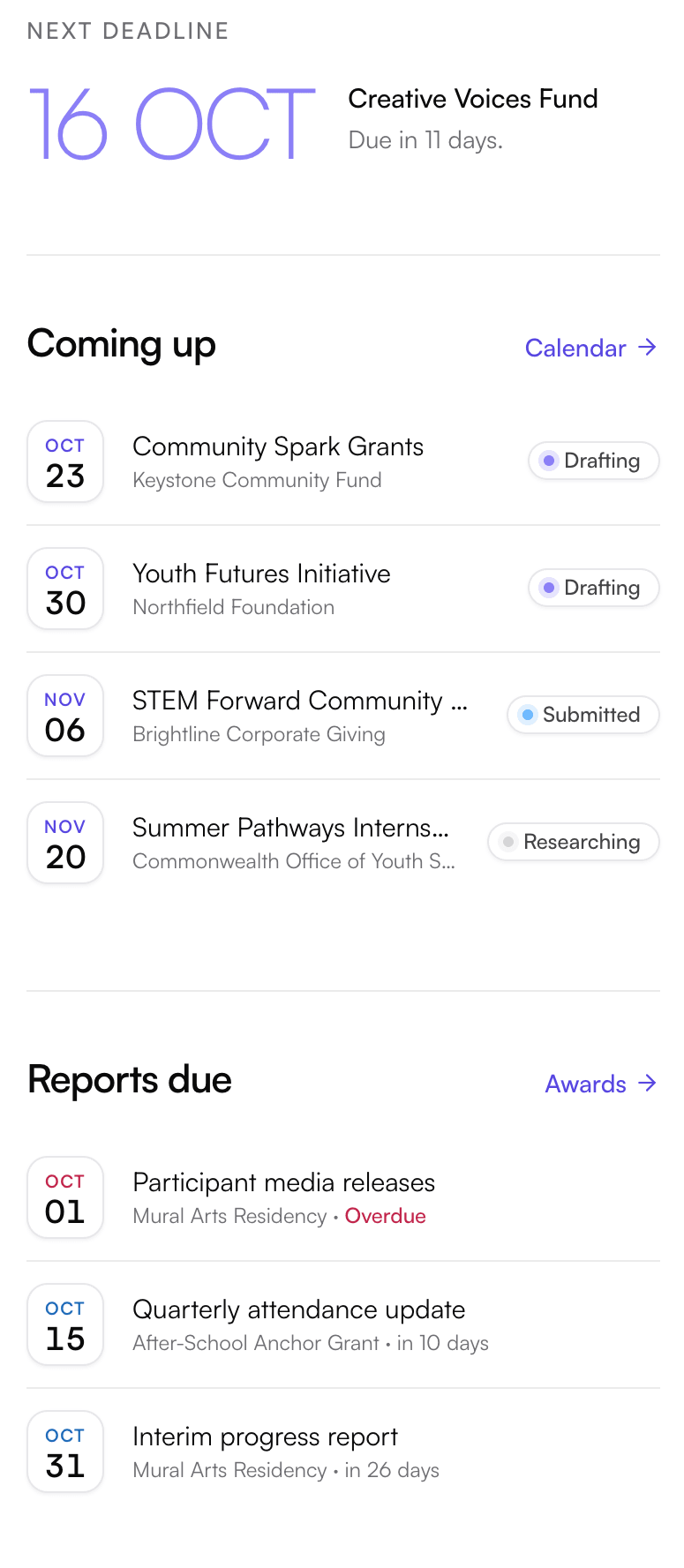
Pursuit deadlines: the next deadline, applications coming up with their stage, and award reports due
Awards and reporting

After the win, stay on track.

Winning is the start of the work. Pursuit turns each award letter into a list of requirements with owners, due dates and the evidence each one needs.

  • Award letter to calendarUpload the letter and Pursuit reads its dates, amounts and obligations, each quoted with the page it came from. You confirm, edit or mark it “not an obligation.”
  • Requirements with evidence listsReports, financial requirements, milestones and compliance items, each with an owner, a due date and a checklist of what to attach.
  • Payments received and scheduledSee what has arrived, what’s still to come and what each payment depends on, such as an accepted interim report.
  • Report drafts from approved outcomesPursuit can draft a report from your verified figures and the evidence collected so far, citing each one. The owner edits and attests before anything is sent.
  • A shared record with Granted fundersWhen the funder runs its grants on Granted, it sees requirement status and the evidence you submit. Drafts and internal notes stay in Pursuit.
Profile and libraries

One verified profile behind every application.

Pursuit keeps the facts funders ask for in one place, with a source for each, and keeps the documents and answers you reuse current.

  • Eight domainsIdentity, mission and programs, leadership, financial, compliance, evidence, standard answers and program taxonomy.
  • Every field has a sourceEach value records where it came from, such as an IRS determination letter or a board resolution, when it was verified and who approved it.
  • Flags when facts go staleWhen a source document expires or changes, the fields that came from it are flagged until someone re-verifies them.
  • You choose what funders seeMark each field shared, on request or private, and preview your profile exactly as a funder would see it.
  • Document libraryDetermination letters, W-9s, audits, budgets and board lists kept as versions with expiry dates, so an expired file is caught before a submission.
  • Answer libraryNarrative written once and reused, with its version, approver and where it was first used. Answers that need review stop being suggested until someone approves them again.
Team and funders

Grant work is a team sport.

Writers, finance, program staff and reviewers each see what they need and change only what they should, with every change on the record.

  • Five roles, scoped by recordA program lead edits only the sections assigned to them; finance approves every budget version; reviewers comment and approve without editing.
  • Tasks and reviewsEach application has its own tasks with owners and due dates, and the home screen collects yours across every application.
  • Funder relationshipsOne record per funder with contacts, a log of calls, emails, meetings and site visits, your applications and awards, and open calls you haven’t pursued yet.
  • An audit log you can’t rewriteEvery consequential change, who made it, when and from where. Entries are never edited or deleted, and the log exports to CSV.
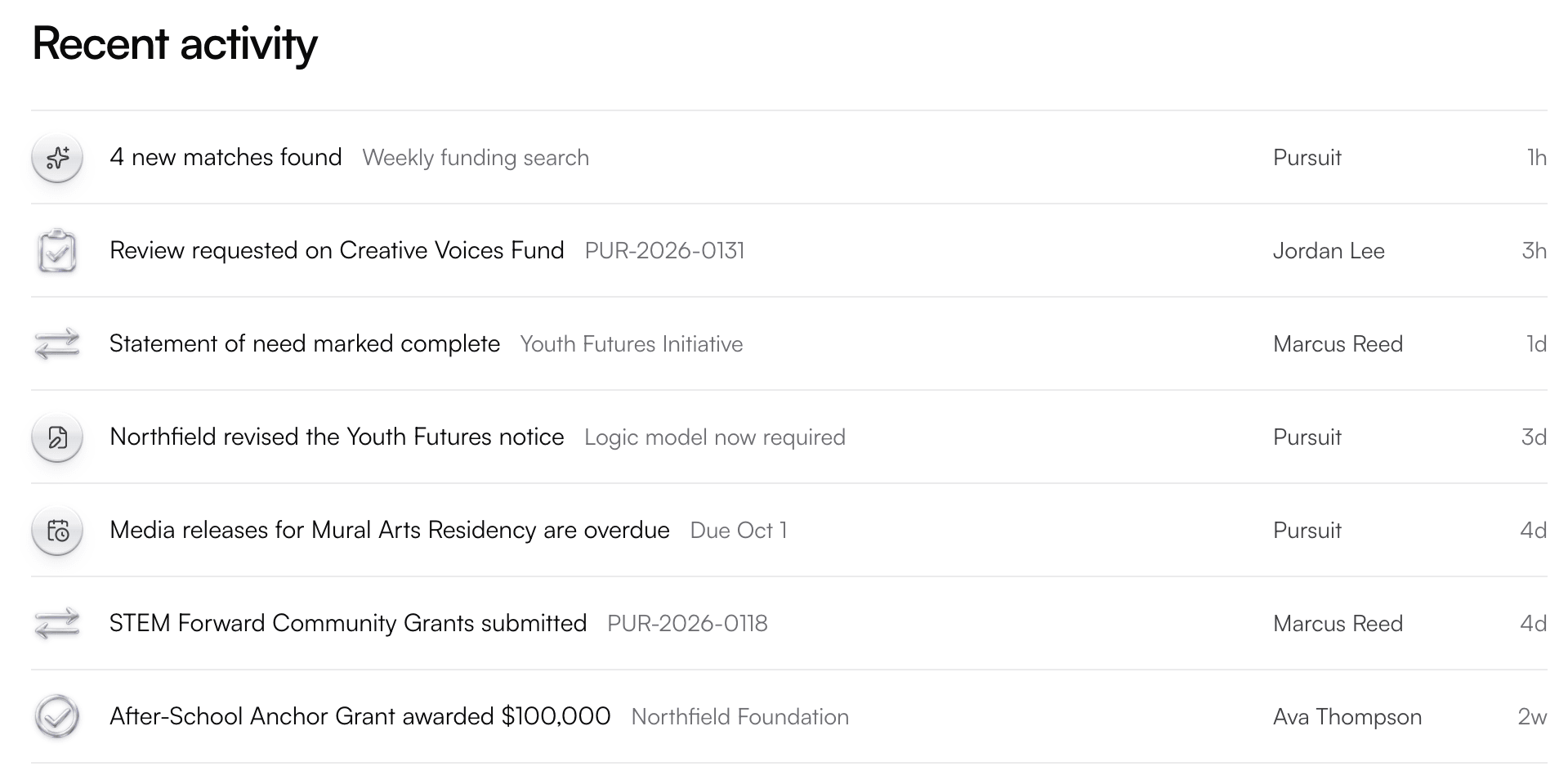
Pursuit recent activity: new matches found, a review requested, a section completed, a funder notice revised, an application submitted and an award received
Everything included

Every capability, in one list.

The complete feature list for Pursuit, grouped so you can find what you’re looking for.

Discovery and matching

  • Four-factor match score with the reasons behind it
  • High, medium or low confidence
  • Editable match profile
  • Grants.gov, funder websites, Granted and team-added sources
  • Weekly match search with new-this-week badges
  • Filter by funder type; sort by fit, deadline, award size or newest
  • Similar matches on every opportunity

Eligibility and notices

  • Eligibility rules quoted from the notice
  • Each rule confirmed by a person
  • Red flags called out early
  • Required documents checked against your library
  • Notice history with every revision
  • Alerts when a notice changes mid-draft

Bringing in opportunities

  • Search and import from Grants.gov
  • Manual entry for foundation and corporate notices
  • Notice text read for rules, documents and dates
  • CSV or Excel tracker import with column mapping
  • Duplicates merged, not repeated

Applications

  • Five-stage pipeline board with dollar totals
  • Section owners, statuses and word limits
  • Funder prompts shown with each section
  • Prefill from your verified profile
  • Version history; locked at submission
  • Readiness checklist before you submit

Budgets

  • Versioned budgets
  • Approval by a named finance lead
  • Narrative and budget consistency checks
  • CSV export for your accounting team

Libraries

  • Answer library with version and approver
  • Answers suggested, never inserted automatically
  • Document library with versions and expiry dates
  • PDF, Word and Excel files up to 25 MB

Deadlines and reminders

  • One calendar for applications, reports and matches
  • Overdue, this week, next two weeks and later
  • Deadline reminders 14, 7 and 2 days out
  • Report reminders 30, 14 and 3 days out
  • Calendar subscription

Awards

  • Award records with amount, period and manager
  • Award letters read and quoted by page
  • Report, financial, milestone and compliance requirements
  • Evidence checklists per requirement
  • Payments received and scheduled
  • Report drafts from approved outcomes

Team and records

  • Owner, grant writer, finance, program lead and reviewer roles
  • Permissions scoped by record
  • Tasks, reviewers and sign-offs
  • Funder relationship log
  • Append-only audit log with CSV export
  • Field-by-field sharing with funders
Who uses it

Built for everyone who touches a grant.

Owners

Run the workspace: everyone’s access, what the profile shares with funders and the organization’s settings.

Grant writers

Draft applications, reuse approved answers, keep the answer library current and prepare award reports.

Finance

Build and approve every budget version, keep the financial profile current and track award payments.

Program leads

Write the sections assigned to them and supply the outcomes and evidence that reports depend on.

Reviewers

Comment on and approve applications and reports before they go out, without editing them.

Funders on Granted

See requirement status and the evidence you submit, plus only the profile fields you’ve chosen to share. Never your drafts.

Trust and control

Your information, your call.

Suggestions with sources

Anything Pursuit reads or drafts cites where it came from, and nothing becomes a rule, a requirement or a sentence until a person accepts it.

You control what’s shared

Every profile field is shared, on request or private, and you can see exactly which funders can see which parts of your profile.

Permissions by role and record

Each person can change only what their role allows, and only on the records they work on.

Records that stay put

Documents are kept as versions that can’t be overwritten, and submitted applications lock.

Append-only audit log

Every consequential change is recorded with who, what, when and from where. A correction is a new entry, never an edit.

Your record, not ours

Budgets, the audit log and trackers export to CSV, so your grant history is never locked in.

White-glove service

Tailored to your team. Supported by ours.

Every organization is different, so we personalize Pursuit and Granted to yours. A dedicated Mijane team sets everything up around how you already work, then stays with you long after launch.

Personalized setup

We configure Pursuit and Granted around your programs: your fields, approval steps, budgets and reports. Never a one-size-fits-all template.

Hands-on onboarding

We walk your team through the platform with live training built around your own grants, so everyone is confident from day one.

A dedicated team

You work with people who know your organization by name, not a ticket queue.

Tailored as you grow

As your programs change, we keep adjusting your setup so the software always fits the way you work.

Share it with your team.

Granted and Pursuit in three pages, with how we set them up and support them.

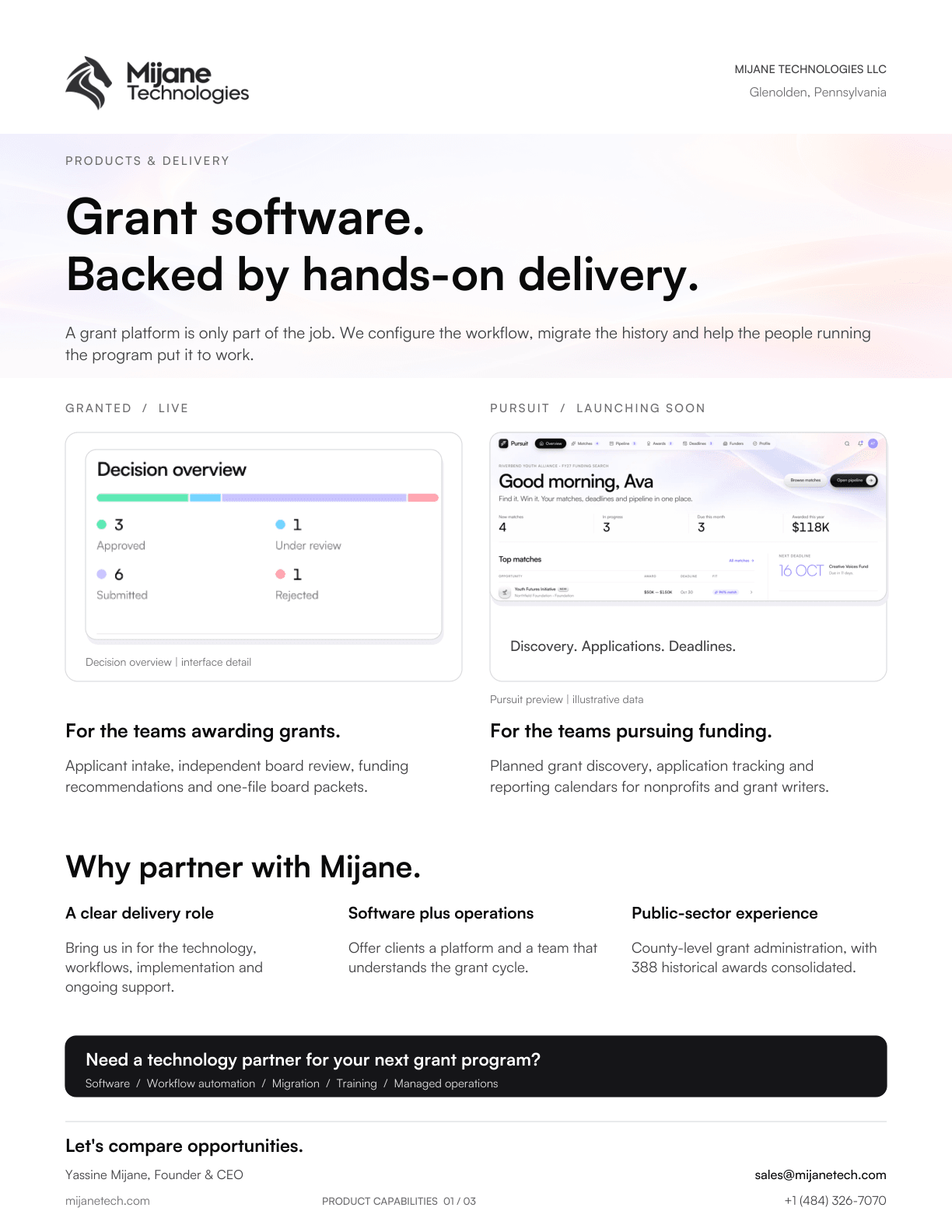
Cover page of the Mijane Technologies product brochure: Grant software. Backed by hands-on delivery.
PDF · 3 pages · 3.2 MB

Product brochure

Granted and Pursuit, what each one does and how we deliver them: board packets, independent reviews, decision records, funding discovery and reporting calendars.

FAQ

Questions about Pursuit.

When can we start using Pursuit?

Pursuit is launching soon. Book a preview and we’ll walk you through it around your own funding search, then let you know as soon as it opens to new organizations.

What is Pursuit?

Pursuit is grant discovery and application management software for nonprofits and grant writers, launching soon from Mijane Technologies. It finds funding that fits, checks eligibility, runs each application with your team and tracks every award’s reports.

Where do the opportunities come from?

Four places: federal notices from Grants.gov, funder websites that Pursuit watches for changes, funding rounds run by funders on Granted, and opportunities your team enters or imports. Each one keeps its source and reference number.

Does Pursuit write our applications with AI?

No. Pursuit fills in facts from your verified profile, suggests answers your team has already approved and reads notices and award letters for rules, dates and obligations, quoting each one. It can draft an award report from approved outcomes, but a person always edits and attests before anything is sent.

How does Pursuit work with Granted?

Pursuit is for organizations that apply for grants; Granted is for organizations that award them. Rounds run on Granted appear among your matches, and an award from a Granted funder becomes a shared record: the funder sees requirement status and the evidence you submit, never your drafts or internal notes.

All 15 questions about Pursuit

See Pursuit with your own grants.

Pursuit is launching soon. Book a preview and we’ll walk you through it, set up around your own grants, and tell you as soon as it opens.