Grant management software for foundations. From open round to close-out.
Granted gives foundations and grant committees one workspace for every round: publish it, invite the organizations you want to hear from, let your committee score and vote, then follow each award through payments, reports and close-out.
- Community foundations
- Private and family foundations
- Grant review committees
- Boards that award grants
Your committee’s time is the scarcest thing you have.
Most of the work in a grant round isn’t the decision. It’s collecting, assembling, chasing and reconciling everything around it.
Packets take days to assemble
Before each meeting, someone gathers every application, score and attachment into one file per applicant, by hand.
Scoring spreads across inboxes
Reviewers send scores by email or type them into a shared sheet, where they can see each other’s votes before casting their own.
Grantees go quiet after the check
Interim and final reports arrive late or incomplete, and unspent funds are hard to keep track of.
Your history is scattered
Who you’ve funded, for how much and how it went sits in years of spreadsheets, so an organization’s full funding history is hard to see.
Every round, start to finish.
A round is one grant program’s application window, budget and rules. Granted runs each one in the same workspace, so you can see every program, application and decision at once.
Rounds in a few fields
Set the overview, maximum award, funding pool and open and close dates. The round appears on your public grants page with a countdown and an “email me when it opens” sign-up.
See how it worksInvite the right organizations
Invite organizations from your directory, including past grantees, or send one organization a private, single-use application link with its own deadline.
See how it worksCommittee scoring and voting
Members score from 1 to 5, vote to fund or deny with an amount and write an assessment. Votes stay hidden until each member casts their own, so no one anchors on the first opinion.
See how it worksBoard packets in one click
One PDF per application, with a cover page, the typeset application and every attachment merged in, ready for the meeting.
See how it worksAwards, payments and reports
Each approved grant becomes an award with its own stage and payment ledger. Grantees file signed interim and final reports, and you accept them, ask for changes or waive them.
See how it worksEvery organization’s funding history
Applications are grouped by organization, matched by EIN or legal name, including awards from before the portal. Search, filter and export the directory to CSV.
See how it works
Meet Granted.
Grant administration for agencies, authorities and foundations: publish a round, take applications, review and vote as a board, then follow every award through payments, reports and close-out.
Every step leaves a record. Status changes, votes, signatures, payments and reports are logged automatically, so when an auditor, a council member or an applicant asks how a decision was made, the answer is already written down.
Explore Granted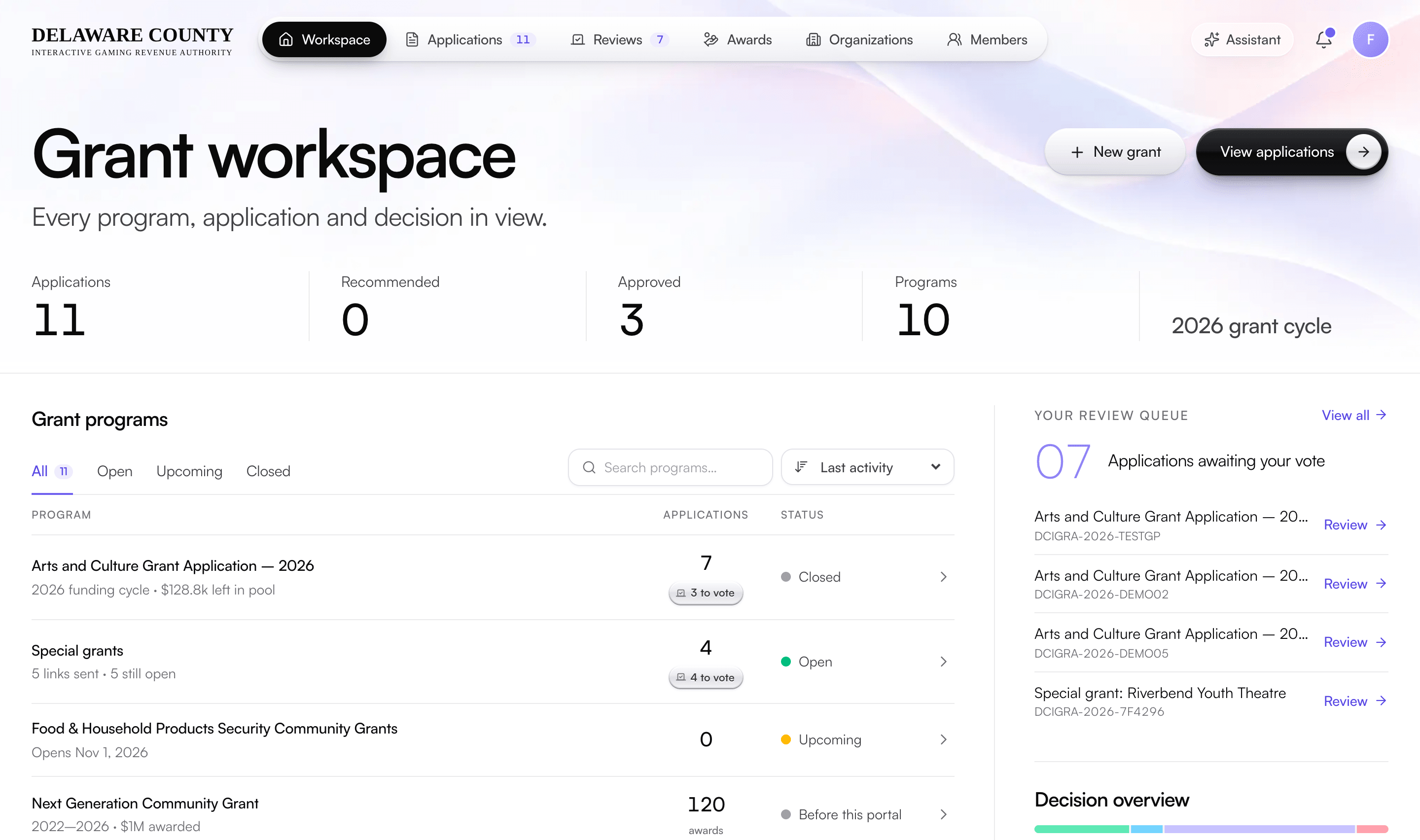
One round, eight steps.
The same steps for every program you run, each one recorded as it happens.
Open a round
Set the round’s overview, maximum award, funding pool and open and close dates. It appears on your public grants page with a countdown.
Invite applicants
Invite organizations from your directory, including past grantees, or send one organization a private application link with its own deadline.
Take applications
Applicants apply without creating an account first, save and finish later, upload documents and sign electronically.
Review and vote
Board members score each application, vote fund or deny with an amount and write an assessment. Other votes stay hidden until you cast yours.
Decide
When a majority of the board agrees, the application is marked recommended. Staff confirm the decision and the applicant is told.
Award and pay
Record your governing body’s approval, then each payment by check or ACH. Granted never lets payments exceed the award.
Collect reports
Grantees file signed interim and final reports with receipts and photos. Staff accept them, ask for changes or waive them.
Close out
Settle any unspent funds, then close the award. Every step, from first application to close-out, stays on the record.
Easier for applicants, less chasing for you.
Applicants don’t have to learn new software. They apply from a public page and follow everything from their own portal, under your name.
No account to start
Anyone can begin an application. An account is created when they submit, with an email to set a password.
Save and finish later
Applicants get an emailed link back to their draft, and returning applicants start with their organization’s details filled in.
An applicant portal
Status, request, documents and a timeline of every status change. Applicants can edit and manage documents until the deadline.
Reports from the same portal
Grantees see their payments and file reports with receipts and photos, signed electronically, without a separate system.
Email at every step
Confirmations, status changes, decisions, invitations and report updates go out on their own, so applicants always know where things stand.
Your brand throughout
Your name and logo on the portal and on every email Granted sends.
388historical awards consolidated into one record
In use at a Pennsylvania county grant authority.
Granted runs the authority’s grant administration: applicant intake, board review and voting, decision records, board reporting and managed operations.
The program used to run on forms, a shared folder, a tracking sheet and email. We moved it to Granted and consolidated its historical awards into one record, so every past grant shows in each organization’s funding history.
Read the customer storySet up for you, not handed over.
Setup, data migration, training and support are part of the subscription. Our team does the configuration, so your staff aren’t left to build the system themselves.
Your form, your board’s rules
We build the application around your program’s questions, often from the paper form you use today, and set up your board’s review rules and your branding.
Your history, brought in
We import your past awards from spreadsheets, so earlier programs show in the workspace and in each organization’s funding history.
Staff and board, trained
We train your staff and board members on your own program, so the first round on Granted isn’t the first time anyone sees it.
Support from people who know your program
A dedicated team after launch. The support chat in the app reaches our team first, and we keep tailoring the setup as your programs change.
Questions from foundations.
Can our grant committee score and vote in Granted?
Yes. Each member scores applications from 1 to 5, votes to fund or deny with an amount and writes an assessment. Other members’ votes stay hidden until you cast your own. A majority produces a recommendation, and staff confirm the final decision.
Can we invite past grantees to apply?
Yes. Choose organizations from your directory, write a message and send. The email carries the round’s details and an apply button, and organizations that already applied are skipped.
Can we offer a grant to just one organization?
Yes. Send one organization a private, single-use application link with its own deadline, and see whether it’s waiting, applied, expired or turned off.
Does Granted create board packets?
Yes. Any application downloads as one PDF with a cover page, the typeset application and every attachment merged in, ready for a meeting.
Can grantees submit their reports in Granted?
Yes. Each round has its own schedule of one to six interim or final reports. Grantees report outcomes and itemized spending with up to 20 attachments, sign electronically, and staff accept the report, ask for changes or waive it.
Can we bring in our past grants?
Yes. We import your historical awards from spreadsheets. They appear as past programs and in each organization’s funding history, so you can see who you’ve funded before.
Can the portal carry our foundation’s branding?
Yes. Your name and logo appear on the applicant portal and on every email Granted sends.
More for foundations.
- PricingHow plans are quoted, and what’s included
- Compare grant softwareGranted beside Submittable, Foundant GLM and others
- Getting startedWhat happens from kickoff to your first round
- Granted for government agenciesPublic programs, records requests and RFPs
- Pursuit for your granteesThe applicant side of a shared award record
See Granted with your next round.
Book a demo and we’ll walk you through Granted set up around a round you’re planning: your application, your committee’s rules and your past grants.