Grant management software for nonprofits. Find the right grants. Then win them.
Pursuit finds funding that fits your mission, checks whether you qualify before anyone writes a word, runs every application with your team and keeps each award’s reports and payments on one calendar.
Pursuit is launching soon. Book a preview to see it with your own grants, and we’ll let you know as soon as it opens to new organizations.
- 501(c)(3) public charities
- Development and grants teams
- Fiscally sponsored projects
- Government and tribal entities that apply for grants
Grant work shouldn’t live in five places.
Many grant teams keep funders in one spreadsheet, drafts in a shared drive and deadlines in someone’s inbox. Here’s where that starts to cost you.
Too many notices, too little time
Finding the few opportunities you can actually win means reading notice after notice, and the good ones are easy to miss.
Eligibility surprises
A requirement you didn’t catch, such as a SAM.gov registration that takes weeks or a required cost share, turns up the week the application is due.
Retyping the same facts
Your EIN, budget, board list and mission get copied into every application, and sooner or later an out-of-date version goes out.
Reports that sneak up
Once you win, report dates and award conditions sit in the award letter, and nobody owns them until one is overdue.
One workspace for every grant you pursue.
Everything starts from one verified organization profile: your mission, finances, leadership and compliance details, recorded once with where each fact came from and reused on every application.
Matches ranked for your mission
Pursuit looks for new opportunities every week and scores each one on mission, geography, budget size and your history with the funder. Every score shows the reasons behind it.
See how it worksEligibility checked before you write
Each rule is quoted from the funder’s notice and confirmed by a person. Red flags are called out early, and required documents are checked against your library.
See how it worksEvery application on one board
Researching, drafting, in review, submitted and awarded. Each card shows the funder, the amount, the owners and the due date, so everyone knows what’s next.
See how it worksWrite once, reuse everywhere
Sections fill in from your verified profile, and answers your team has already approved are suggested where they fit. Nothing goes in without a person choosing it.
See how it worksEvery date on one calendar
Application deadlines, award reports and new matches share one calendar, with reminders before each deadline and a feed you can add to Google Calendar or Outlook.
See how it worksAwards that stay on track
Upload the award letter and its dates, amounts and obligations become requirements with owners, due dates and a checklist of the evidence each one needs.
See how it works
Meet Pursuit.
Grant software for nonprofits: find funding that fits, run every application with your team, and keep each award’s reports and payments on schedule.
Pursuit ranks and suggests; your team decides. Anything Pursuit reads from a funder’s notice or an award letter is quoted from the source and waits for a person to confirm it before it counts.
Explore Pursuit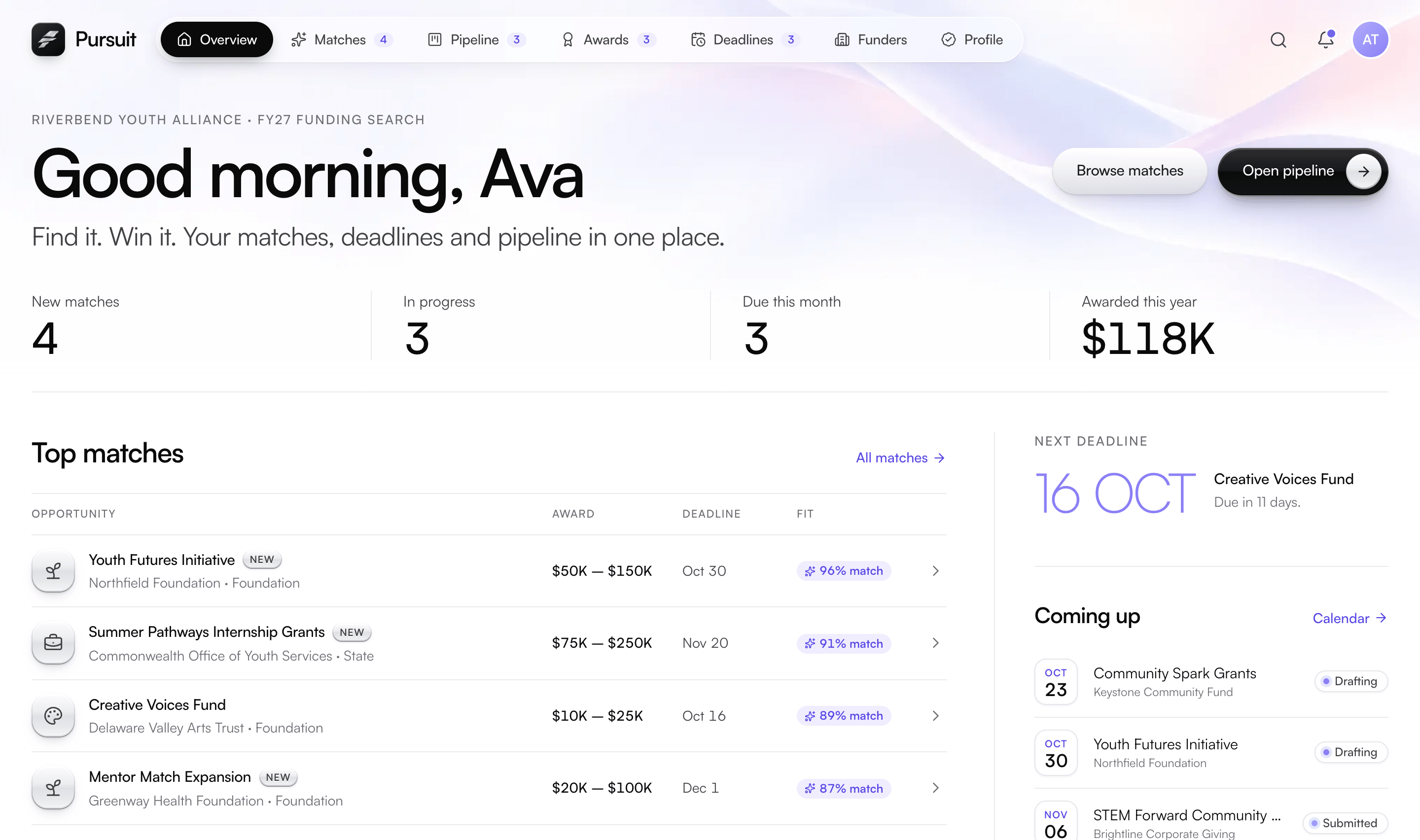
Pursuit is launching soon. The screens on this page are a product preview, with an illustrative organization, opportunities and figures.
From first match to final report.
Seven steps, with your team deciding at every one.
Build your profile
Tell Pursuit about your organization once: legal name and EIN, mission and focus areas, budget, regions served and the funders you want to pursue.
Get matched
Pursuit ranks opportunities against your mission, geography, budget size and history with each funder, and flags what’s new each week.
Check eligibility
Before anyone writes a word, each rule is quoted from the notice, red flags are called out and required documents are checked against your library.
Plan the work
Add the grant to your pipeline, give every section an owner and set tasks and due dates for the whole team.
Write and review
Sections fill in from your verified profile, approved answers are suggested where they fit, finance approves the budget and reviewers sign off.
Submit and track
The readiness checklist shows what still stands in the way. Once submitted, the application locks and every date lands on one calendar.
Manage the award
Upload the award letter and its terms become requirements with owners, due dates and evidence lists, alongside the payments you receive.
Your information, your call.
Pursuit suggests and ranks; people decide. Anything it reads from a funder’s notice or an award letter is quoted from the source and waits for a person to confirm it.
Suggestions with sources
Anything Pursuit reads or drafts cites where it came from, and nothing becomes a rule, a requirement or a sentence until a person accepts it.
You choose what funders see
Mark each profile field shared, on request or private, and preview your profile exactly as a funder would see it.
Permissions by role and record
Owner, grant writer, finance, program lead and reviewer. Each person changes only what their role allows, on the records they work on.
Records that stay put
Documents are kept as versions that can’t be overwritten, and an application locks when it’s submitted.
An audit log you can’t rewrite
Every consequential change is recorded with who, what, when and from where. A correction is a new entry, never an edit.
Your record, not ours
Budgets, the audit log and trackers export to CSV, so your grant history is never locked in.
When your funder uses Granted, you share one record.
Granted is our software for organizations that award grants. When a funder runs its grants on Granted, the two connect, and each side sees only what it should.
Their rounds become your matches
When a funder opens a round on Granted, it can appear among your matches in Pursuit.
Your profile, shared on your terms
You choose which verified profile fields a funder can see, and you can preview exactly what that funder sees.
One shared award record
The funder sees requirement status and the evidence you submit. Drafts and internal notes stay with you.
Set up around your grants, not a blank screen.
Our team configures Pursuit around your programs, brings over the tracker you use today and trains your staff on the grants you’re working on now, then stays with you after launch.
Configured for your programs
We set Pursuit up around your programs and help you build your organization profile, so your first matches reflect your real work.
Your tracker, imported
Upload a CSV or Excel tracker and map its columns once. Rows that match records already in Pursuit are merged rather than duplicated.
Trained on your own grants
Training uses the applications and awards your team is handling today, not a demo account.
Support after launch
The same team that set you up stays with you, and keeps tailoring your setup as your programs grow.
Questions from nonprofits.
What is grant management software for nonprofits?
Software that keeps a nonprofit’s grant work in one place: finding opportunities, checking eligibility, writing and reviewing applications, tracking deadlines and meeting each award’s reporting requirements. Pursuit does all of that around one verified organization profile.
When can we start using Pursuit?
Pursuit is launching soon. Book a preview and we’ll walk you through it around your own funding search, then let you know as soon as it opens to new organizations.
Where does Pursuit find grants?
Four places: federal notices from Grants.gov, funder websites that Pursuit watches for changes, funding rounds run by funders on Granted, and opportunities your team enters or imports.
Does Pursuit write our applications with AI?
No. Pursuit fills in facts from your verified profile and suggests answers your team has already approved, but writers choose what goes in, finance approves the budget and reviewers sign off before anything is submitted.
Can we bring our existing grant tracker?
Yes. Upload a CSV or Excel file, map its columns once, and rows that match records already in Pursuit are merged rather than duplicated. Our team can do the import with you during setup.
Who on our team can use Pursuit?
Everyone who touches a grant. There are roles for owner, grant writer, finance, program lead and reviewer, and each person changes only what their role allows, on the records they work on.
How much does Pursuit cost?
Pricing depends on the size of your team. After a short call we send a clear quote with no hidden fees, and our team does the setup and trains your staff on your own grants.
More for nonprofits.
See Pursuit with your own grants.
Pursuit is launching soon. Book a preview and we’ll walk you through it, set up around the grants you’re pursuing now, and tell you as soon as it opens.